The 5 CRM Stages Every Distributor Sales Team Should Know
Most distributor sales teams struggle because the sales process exists everywhere and nowhere at once: some of it lives in a rep’s head, some in a manager’s spreadsheet, and fragments scattered across ERP screens and shared inboxes.
That lack of structure is what customer relationship management (CRM) stages are meant to address. CRM stages create a shared path, clarify what good looks like at each step, and make it obvious what needs to happen next.
Why CRM Stages Matter More Than CRM Features
Most CRM conversations start with features. But stages matter more because they form the structural model reflecting how your team actually works. That structure creates shared expectations across sales, operations, and service—shaping what data gets logged, how follow-ups happen, and when information is ready to be handed off.
When stages are clear, sales, operations, and service teams work from the same picture of the customer. When the stages aren’t clear, information fragments and work slows down, even if the CRM itself is powerful.
The difference between tracking activity and guiding sales action
The difference between tracking activity and guiding sales action is whether the CRM only records past work or shapes what happens next. Activity tracking logs calls, emails, and meetings. A stage-based approach uses those interactions to move an opportunity forward and define the next step. This creates a system of action instead of simply a system of record.
White Cup, a CRM built specifically for distributors, is a useful example of this approach. Sales activity, account history, and ERP data live in the same workflow, so updates change the state of an opportunity rather than sitting as isolated notes. With White Cup, stage movement reflects progress instead of activity volume.
Why distributors struggle with inconsistent follow-up and pipeline visibility → content gap: many CRM guides focus on tools, not stages
When CRM guidance centers on tools instead of stages, the system defaults to activity tracking. Calls get logged. Emails get recorded. But nothing defines what should happen next. Follow-up decisions fall to individual reps, and the pipeline reflects personal habits rather than shared priorities.
That lack of structure matters even more in distribution environments, where reps manage large account bases and competing demands. McKinsey research shows that sales reps spend less than one-third of their time on direct selling, with the rest absorbed by admin, coordination, and internal work. When time is limited and the CRM doesn’t signal what deserves attention, follow-up becomes reactive rather than deliberate.
The result is uneven account coverage and unreliable pipeline visibility. Urgent accounts get attention. Quieter revenue risks drift. Pipeline reviews reflect activity, not consistent stage progression. This is especially true for distributors using all-purpose CRMs that rely on generic pipelines rather than stage definitions tied to actual distributor workflows.
How defined stages create accountability without admin overload
Defined stages create accountability by setting clear expectations for progress without requiring constant status updates or manual explanations. Each stage establishes what needs to be true for an opportunity to move forward, so reps spend less time deciding what to log.
Defined stages also reduce variation across reps. With clear entry and exit criteria, opportunities move forward based on shared rules. Reps know what qualifies as progress, and managers can review pipelines without decoding individual workflows. The CRM carries the structure instead of relying on people to recreate it on their own.
Stage 1 – Lead & Opportunity Identification
This stage defines what deserves attention. In distribution, that isn’t limited to net-new prospects. It also includes existing accounts showing signals that something has changed and is worth acting on.
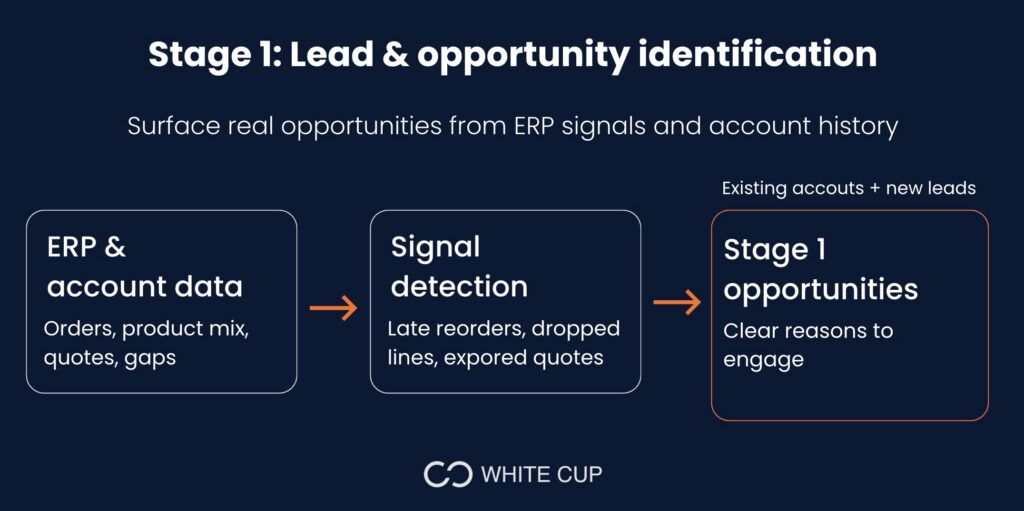
Opportunity identification works best when it pulls from real account behavior. While inbound leads matter, many distribution opportunities originate within existing accounts—through changes in order frequency, product mix shifts, expired quotes, or purchasing gaps. The CRM should surface those signals clearly and give reps a place to capture them as opportunities, not leave them buried in reports or mental notes.
Turning ERP data and account history into real opportunities
In Stage 1, ERP data provides the context needed to decide whether something deserves attention. When that history is visible in the CRM, reps can identify opportunities based on changes in behavior rather than intuition.
This is especially important in distribution, where many opportunities come from existing accounts. Without ERP context, those signals stay fragmented across systems and never make it into the pipeline.
Avoiding missed upsell and reorder signals
Many opportunities in distribution are incremental and easy to miss. A reorder that arrives late, a product line that quietly drops off, or a customer that stops buying a high-margin item signals a need for outreach. Stage 1 should capture these moments before they fade. When upsell and reorder signals are treated as first-class opportunities, reps have a clear reason to engage. The CRM reflects what changed and why it matters, instead of leaving follow-up to chance.
Stage 2 – Qualification & Prioritization
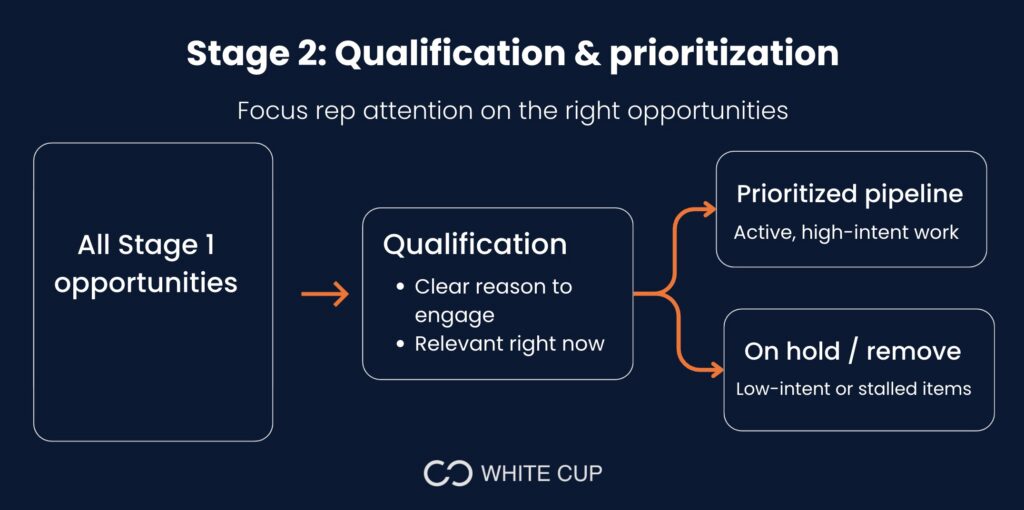
Stage 2 narrows focus. After signals are captured in Stage 1, this stage determines which opportunities merit time and which should wait. The goal is to protect rep attention by making intent and relevance clear.
Identifying which opportunities deserve rep attention
In practice, qualification means capturing why the opportunity exists and whether there’s a real reason to engage at this moment. If a rep can’t tell at a glance why an item is in the pipeline, it probably doesn’t belong there yet.
Preventing pipeline clutter that hides real revenue
Pipeline clutter builds when opportunities stay open without a clear next step. Quotes linger, low-intent items remain active, and the pipeline stops reflecting what reps are actually working. Stage 2 should make it easy to pause or remove items that are not moving, so the pipeline stays focused on current, active work.
Stage 3 – Active Selling & Follow-Up
Stage 3 is where most CRM friction shows up. This is the point where quotes are out, conversations are ongoing, and next steps matter. The role of the CRM here is to keep work moving without forcing reps to reconstruct context every time they open an opportunity.
Managing quotes, conversations, and next steps
In this stage, a rep should be able to open an opportunity and understand its status in seconds. If that information lives across emails, notes, or separate tools, the CRM stops being the source of truth.
A simple test: if a different rep or manager cannot step into the opportunity and understand what’s happening without explanation, the CRM is not carrying enough context in Stage 3.
Reducing follow-up lag that causes deals to stall
Follow-up should be tied to the opportunity itself, not managed as a separate task list. In Stage 3, each opportunity should have a clear next action and timing that reflects where the deal stands. When that expectation is visible, follow-up becomes part of the workflow.
If stalled opportunities look the same as active ones, the stage definition is too loose. Stage 3 should make it obvious which deals are moving and which need attention now.
Stage 4 – Close & Conversion
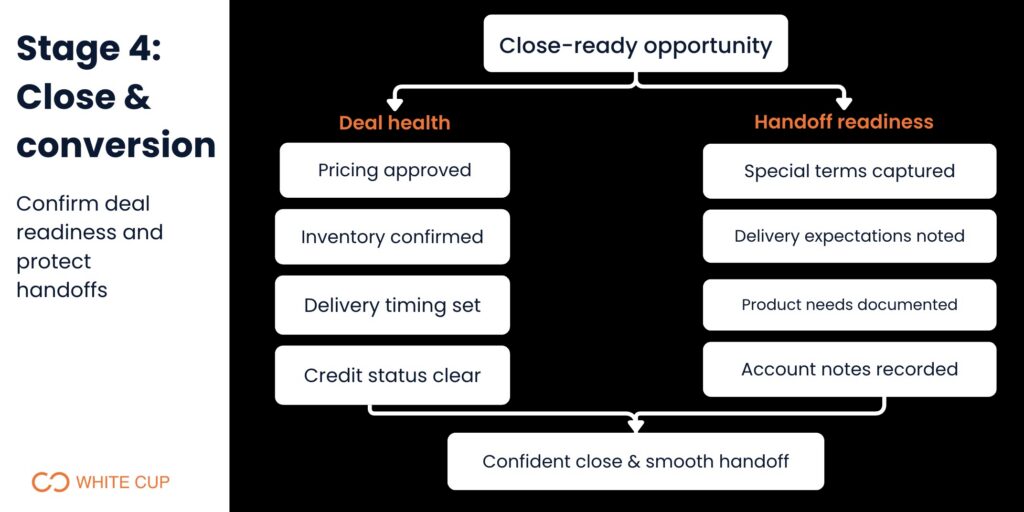
Stage 4 confirms whether an opportunity can close as expected. The CRM’s role here is to surface anything that could block or delay the outcome before it becomes a problem.
Visibility into deal health and close probability
At this stage, an opportunity should reflect the conditions required to close. Pricing approval, inventory availability, delivery timing, and credit status need to be visible so reps know whether the deal is ready to move forward. If this information sits outside the CRM, close dates become guesses instead of commitments.
A useful check: if a deal is marked close-ready but still requires follow-up to validate basics, Stage 4 is not doing its job.
Ensuring handoffs don’t break the customer experience
Closing the deal also means capturing what was agreed to. Special terms, delivery expectations, product requirements, and account notes need to be recorded in a way that carries forward. Stage 4 should leave no ambiguity about what happens next. If teams downstream have to ask sales to clarify details after a close, the stage definition is incomplete.
Stage 5 – Retention, Expansion & Long-Term Value
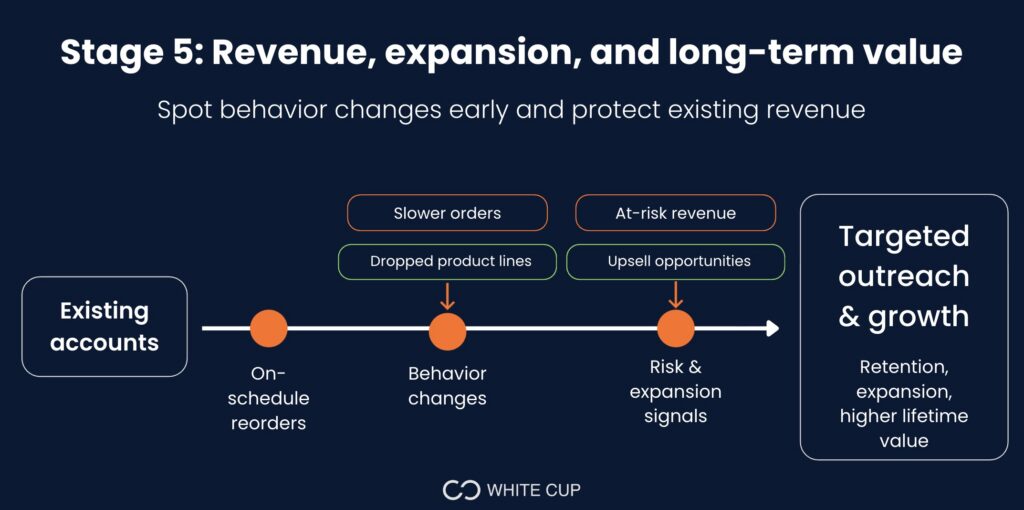
Stage 5 keeps existing accounts from drifting and turns ongoing activity into something observable. The CRM’s role here is to make changes in account behavior visible early enough to act on them.
Tracking reorder behavior and account growth
At this stage, the CRM should make reorder patterns easy to monitor without manual checks. Reps need to see whether an account is ordering on schedule, slowing down, or changing what they buy. When those patterns are visible in the account view, follow-up is driven by behavior rather than routine.
A practical test: if reps have to run reports or rely on memory to spot a missed reorder, Stage 5 is not carrying enough signal.
Using CRM insights to protect and expand existing revenue
Expansion and retention depend on small, timely actions. Stage 5 should highlight moments that warrant outreach, such as a dropped product line, a change in order size, or a long gap between purchases. Those signals give reps a clear reason to engage instead of relying on periodic check-ins.
Conclusion: Building a CRM Stage Model That Sales Teams Actually Use
CRM stages only work when they reflect how distributors sell, follow up, and manage accounts over time, in real life. When stages are clear, opportunities move with purpose. When they aren’t, even well-configured CRMs turn into activity logs and guesswork.
This is where platforms like White Cup CRM + BI stand out as a practical reference. White Cup is built around stage-based workflows that connect sales activity, ERP data, and account behavior in one system. Opportunities progress based on real signals, follow-up stays tied to stages, and account changes surface where reps work instead of in disconnected reports. You can edit the pipeline stages and property fields in White Cup to match your team’s workflows exactly.
For distributors evaluating their CRM approach, the takeaway is simple: focus less on feature lists and more on whether the system supports clear stages from identification through long-term account value. When the CRM carries that structure, teams spend less time managing the system and more time acting on what matters.
The transition into sales leadership is one of the most critical — and most overlooked — moments in a distributor’s growth. In our free on-demand webinar, “Master the First 90 Days,” experienced sales leaders share the frameworks they use to assess team performance, establish trust with reps, and deliver measurable results before the quarter is out. Watch it on demand →
Sources:
- McKinsey, The secret to making it in the digital sales world: The human touch
Written By